Step 5 - Download Reference Layers from Protomaps
In this step, we'll download a tile extract for Waiheke Island to use as our map's basemap (roads, labels, landcover, etc.).
Downloading Protomaps
Protomaps provides global basemap tiles stored in PMTiles format and extractable by bounding box, so you can grab just what you need to provide some reference layers on your trail map.
Install PMTiles CLI
We need the PMTiles command-line tool to download and extract a small subset of Protomaps, which is stored as a PMTiles file with global extent.
If you're in Codespaces, PMTiles CLI is already installed — skip to Verify Installation.
If you're working locally, follow the installation instructions for your operating system:
macOS
brew install pmtiles
Linux
Download from https://github.com/protomaps/go-pmtiles/releases or follow the Protomaps Getting Started guide.
Windows
-
Download the Windows binary:
- Visit https://github.com/protomaps/go-pmtiles/releases
- Download the latest
pmtiles-windows-amd64.exefile
-
Choose one of these options:
Option A: Add to PATH (recommended for ongoing use)
- Create a folder for tools (e.g.,
C:\tools) if you don't have one - Move the downloaded
pmtiles-windows-amd64.exeto that folder - Rename it to
pmtiles.exe - Add the folder to your system PATH:
- Press
Win + R, typesysdm.cpl, press Enter - Go to "Advanced" tab → "Environment Variables"
- Under "System variables", find "Path" and click "Edit"
- Click "New" and add your tools folder path (e.g.,
C:\tools) - Click OK on all dialogs
- Press
- Open a new terminal/command prompt and verify:
pmtiles version
Option B: Use from download location (simpler for one-time use)
- Place the downloaded file in your repository root directory
- Rename it to
pmtiles.exe - Use it with the full path:
.\pmtiles.exe version(orpmtiles.exe versionfrom the repo root)
- Create a folder for tools (e.g.,
Verify Installation
Open a terminal and run:
pmtiles version
Define the Bounding Box
For Waiheke Island, Auckland, New Zealand, we'll use this bounding box:
- West (min longitude): 174.8
- East (max longitude): 175.2
- South (min latitude): -37.0
- North (max latitude): -36.7
Format: We'll structure the bounding box as a list of west, south, east, north coordinates, and end up with 174.8, -37.0, 175.2, -36.7
This bounding box includes:
- The entire Waiheke Island
- Some surrounding water for context
- A small buffer around the island
Tip: Need to find a bounding box for a different area? Use bboxfinder.com — draw a rectangle on the map and it will give you the bounding box coordinates in the format you need.
Find the Latest Protomaps Build
- Check Protomaps builds: Visit https://maps.protomaps.com/builds/
- Find the latest daily build: Look for the most recent successful build in the "date" column (builds run nightly; usually makes sense to use the most recent one)
- Note the date: It will look like
YYYYMMDD(e.g.,20260408) - Click xray in the same row to inspect the tile layers in the basemap data
- Zoom in on Waiheke Island
- Toggle
poison and off — what features are these?
Download the Protomaps Extract
Replace YYYYMMDD with the date of the build you identified above:
pmtiles extract https://build.protomaps.com/YYYYMMDD.pmtiles sources/waiheke_island.pmtiles \
  --minzoom=10 \
  --maxzoom=16 \
  --bbox=174.8,-37.0,175.2,-36.7
Parameters explained:
--minzoom=10: Start extracting when zoomed in this far — at lower zoom levels the island is too small to be useful--maxzoom=16: Maximum zoom level (the highest detail available in the data)--bbox=174.8,-37.0,175.2,-36.7: Bounding box for Waiheke Island
Note: For this small area the extract will typically be 20–60 MB, comfortably under GitHub's 100 MB per-file limit.
Wait for Download
The download process can take a few minutes depending on your internet connection and server load. You'll see progress output showing download status, tile count, and total file size.
Commit Your Changes
Follow the process from Step 2 to add, commit, and push waiheke_island.pmtiles to your remote fork.
What You Have Now
At the end of this step, you should have:
sources/waiheke_island.pmtiles: Protomaps basemap tiles for Waiheke Island
In the next step, we'll configure the stylesheet to style the Protomaps tiles and integrate them into your map.
Your Map Preview
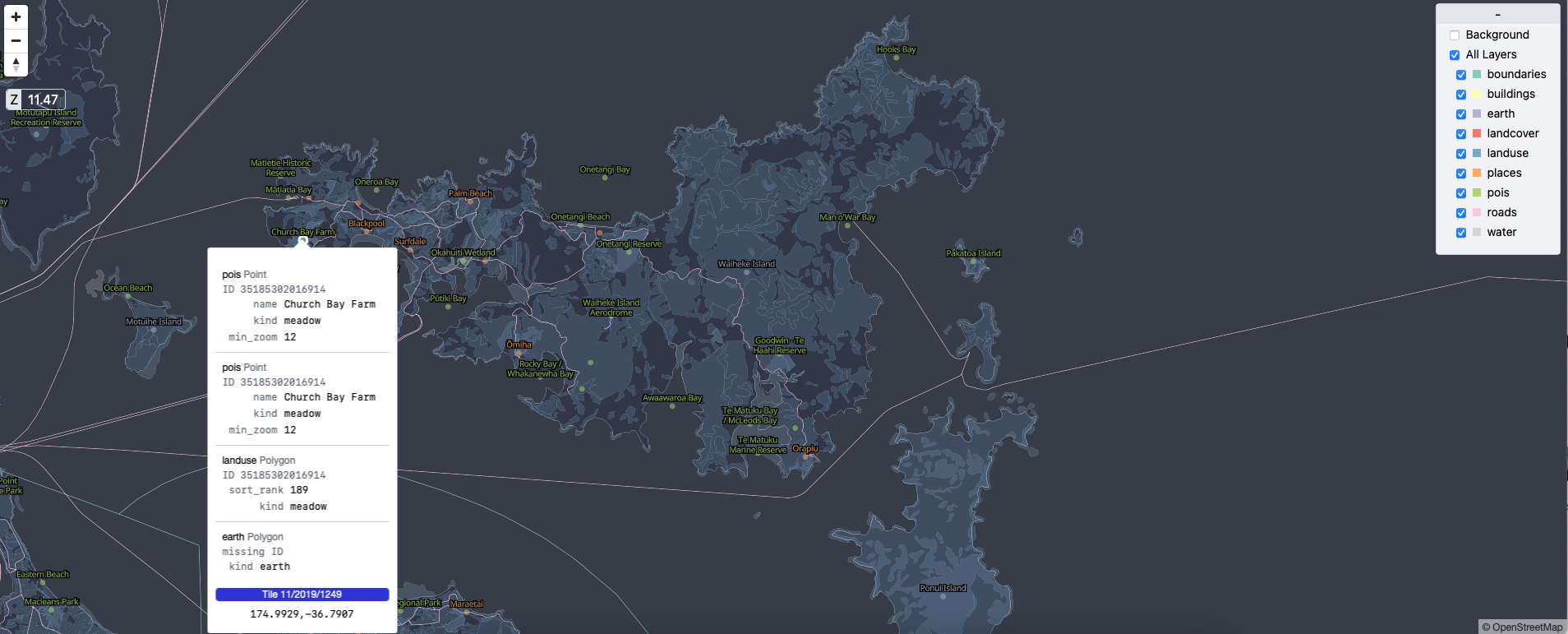
The xray view of Protomaps tiles for Waiheke Island
← Previous: Step 4 | Next: Step 6 - Configure the Stylesheet →